

This blog is completely dedicated to Canon Camera Errors and Fixes… So go through it if encountering any such issues and want to fix it.
Canon EOS camera users are frequently getting error code and message appearing at its LCD screen. Actually, this has also lead to photos and video loss in the Canon EOS Camera. But, How to Fix Canon Camera Errors?
Here, we’ve shared a detailed blog to help you out with Canon Camera Errors and Fixes to get rid of these irritating errors popping up. However, you can’t you undone photos deleted from Canon Camera with these manual steps.
Don’t Worry! Actually, we’ve found a shortcut to recover files deleted due to Canon Camera Errors. Download the Free Canon Photo Recovery Software to get your lost photos and videos back.
When it comes to capturing beautiful scenery and emotion, Canon EOS Camera has a big deal. However, Canon EOS Camera Error Code and messages like Err 01, 02, 03, 04, 05, 10, 20, 30, 40, 60, 70, 80, Err 99, bu59 / bu54 / buSY / busy, No CF Card, Card Full, battery level is too low and many more leads to data loss.
Losing your memories captured in beautiful pictures is the worst experience one can go through. So, we’ve gathered several Canon Camera Errors and Fixes to help you out.
So, here’re Canon Camera Errors and Fixes
Below mentioned are the most encountered Canon camera errors with their respective fixes…
#1: Canon Camera Error Code– Err 01
Simply, Canon Err 01 means the breakdown of communication between the lens and camera.
Solution:
- Clean the camera lens gently and the electrical contacts (red-colored highlighted area). Use a dry and clean cloth to do so.
Precautions:
While cleaning the camera, keeps these things in mind:
- Never use a damp cloth for cleaning camera
- Don’t touch the camera with hands ( it cause corrosion)
- Carefully clean the contacts on the lens side, it can get damaged.
#2: Canon EOS Camera Error Code– Err 02
Canon Err 02 message arises when the camera is not able to read the storage disk or memory card.
Solution:
To Fix EOS Camera Errors 02 use the following steps:
- Remove and reinsert the memory card again.
- Format your memory card (follow your user manual for this. if lost download from official website of canon)
- Also, you can format it by using your PC.
- Still, if the issue arises to replace the card with a newer one.
#3: Canon Camera Error Code– Err 03 [Canon Camera Errors and Fixes]
Getting Canon ERR 03 in your EOS digital camera? This means your memory card is full of numerous folders.
Solution:
To Troubleshooting Canon EOS camera problems Error 03 is very simple to use the following steps:
- All you have to move folders from the Canon memory card to your PC. Then delete them from the camera disk.
- Don’t want to clean up folders from your card? Then replace it with a new memory card.
#4: Canon EOS Camera Error Code– Err 04
Is your canon camera getting ERR 04? Well, this simply means your Canon EOS camera is not able to save captured images because the storage is full.
Solution:
To Fix Canon Camera Error 04 use this method:
- Delete useless photos/videos or other files from your memory card to empty some space.
- You can also move your files on your PC or pen drive or other storage device. Format the card and use it to resolve the issue.
#5: Canon Camera Error Code – Err 05 [Canon Camera Errors and Fixes]
Canon ERR 05 appears when the built-in flash couldn’t operate.
Solution:
- The best way to Fix Canon Camera ERR 05 is to Switch OFF your canon camera and Turn in ON again.
#6: Canon EOS Camera Error Code– Err 06
Sometimes users get Canon Camera Err 06 “Self Cleaning Sensor Unit malfunction. Consult with Canon Service Center.”
Solution:
- Turn off your camera and turn it on again. This is the best way to Fix Canon Camera Errors.
#7: Canon Camera Error Code – Err 10/20/30/40/50/70/80’
When do you get these Canon EOS Camera Errors-
Canon Err 10 – When Camera detects file system malfunction
Canon Err 20 – When it senses mechanical malfunction
Canon Err 30 – in shutter malfunction
Canon Err 40 – in power malfunction
Canon Err 50 – When the camera discovers electric control malfunction.
Canon Err 70 – Notices image related malfunction.
Canon Err 80 – when the camera detects image or electric control malfunction
Solution:
To Troubleshooting Canon EOS camera problems ERR 10/20/30/40/50/70/80 Follow these steps:
- Switch of your Canon EOS Camera
- Remove the battery and wait for 15-20 seconds
- Reinstall your battery and switch it on again
Well, these steps are applicable in the following fixes.
- Canon Error 30 Fix
- Canon Error 70 Fix
- Canon Error 50 Fix
- Canon Error 60 Fix
- Canon Err 11 Fix
Also, this simple methods work for Canon Connect Error 11, Canon Eos R Error 70 and Canon 60d Error 70. Well, there’re nothing like Canon Error 20 Repair Cost you have to pay. All you have to do is follow Canon Err 20 fix to resolve it.
However, these were the manual methods you can stop these reoccurring Canon error codes. Still, the delete photos and videos can’t be recovered by these steps. Nonetheless, with free software you can recover deleted photos from canon camera within minutes.
Canon Photo Recovery Software
Usually, due to these errors photos and videos from your canon camera get deleted. However, with the free Canon Photo Recovery Software, you can download your lost data easily and quick. This Canon Photo Recovery Program works in data loss situations whatever the reason is corruption, deletion, virus, inaccessible drives, formatting, etc.
Well, you can also download the paid version to access more advanced features of Canon Photo Recovery Software. Moreover, the software has some stunning features. Have a look here!
Feature of Canon Photo Recovery Software
- Restores deleted videos, photos, and music files
- Recovers photos with original date-timestamp & name
- Retrieves from corrupt, formatted, & encrypted storage media
How to Recover Photos with Canon Photo Recovery Software For Windows
- Free Download Canon Photo Recovery Software for Windows and launch it.
- Choose the file type you want to recover and click ‘Next’.
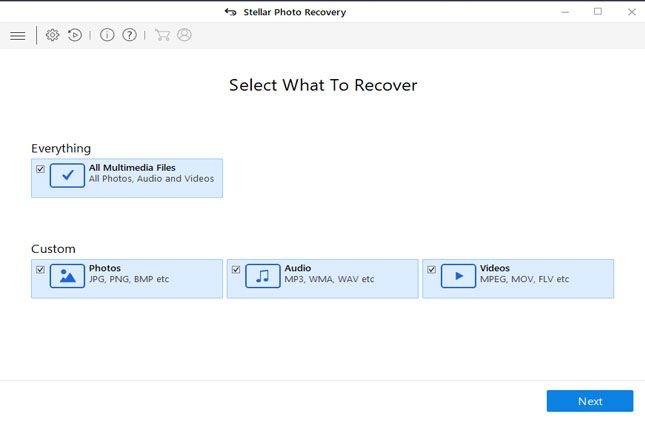

- Choose a location from where you want to recover your lost photos and videos.

- Click the ‘Turn on Preview’ option to view files while scanning.

- Preview all restorable files become scanning completes. Sort the result by ‘File Type’, ‘Tree View’ and ‘Deleted List’.

- At last, the select the location to recover your file and click ‘Recover’ to save found data.
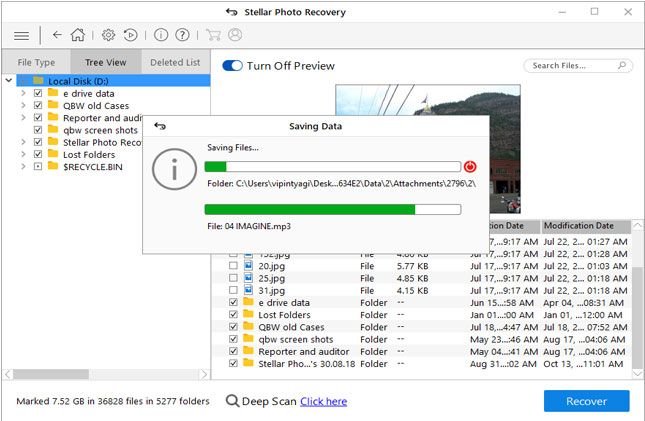
**Note: Free version of this Canon Photo Recovery Software allows you to recover data upto 1 GB only. For further recovery of data, you’re require to go for its licensed version. Means you to buy it.
How to Recover Photos with Canon Photo Recovery Software for Mac
- Free download Canon Photo Recovery Software for Mac and install it.
- Choose the type of file you would like to restore and click ‘Next’.

- Choose a location from where you want to get your deleted photos and videos.
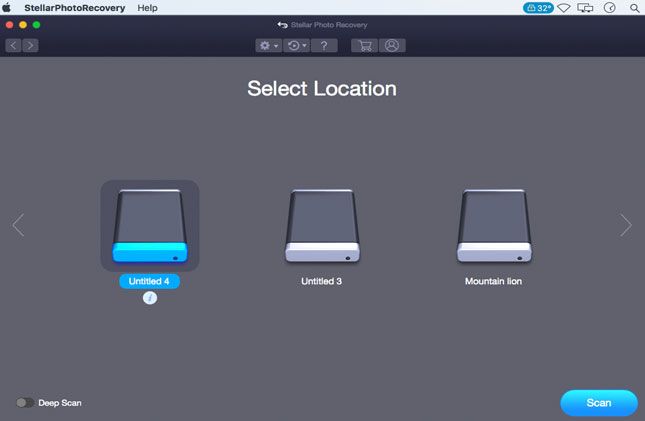
- Click ‘Turn on Preview’ to view files while scanning.

- As the scanning process completes previews all restorable files. You can sort & view them by ‘File Type’, ‘Tree View’ & ‘Deleted List’.
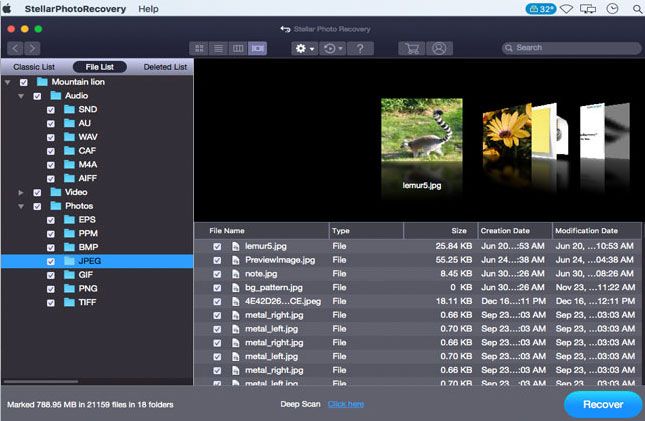
- At last, select the location where you want to save your recovered files.

**Note: Free version of this Canon Photo Recovery Software allows you to recover data upto 1 GB only. For further recovery of data, you’re require to go for its licensed version. Means you to buy it.
OK… so here finally ends up all about Canon Camera Errors and Fixes. Now have a quick glimpse onto the prevention measures of camera photos deletion.
Tips to Prevent Canon Digital Camera File Deletion
With few precautions from your side, you can prevent your photos and videos from getting deleted.
- Making regular backup of your Digicam is vital. Well, you can make a backup in your PC, external drive, pen drive or even cloud.
- Before deleting files make sure you won’t need it in the future.
- Never connect your Canon EOS Camera with virus-infected devices
- Prevent your PC from water or physical damage.
- After data loss, stop using the camera until you recover your lost file.